


Apple introduces a Messages setting in iOS 27 (and iPadOS 27) that lets users control whether the audio/dictation icon appears in the Messages text field. Multiple outlets report the icon is close to the send area, making accidental taps common and sometimes triggering dictation or audio-message recording. The new option in Settings allows users to hide the button entirely or choose which function it shows. The change appears under Settings > Apps > Messages > Show in Text Field. Users can select “Record Audio,” “Start Dictation,” or “None.” If users choose “None,” they can still access dictation from the microphone button on the keyboard. If users want to send an audio message, sources say they can tap the “+” button to the left of the input field and select Audio. One outlet notes the icons’ placement has been the subject of public complaints, and Apple’s new control is presented as a direct response to the problem. iOS 27 is described as in beta, with a public release expected in September.
iOS 27 adds setting to hide Messages’ audio/dictation button
Apple introduces a Messages setting in iOS 27 (and iPadOS 27) that lets users control whether the audio/dictation icon appears in the Messages text field. Multiple outlets report the icon is close to...
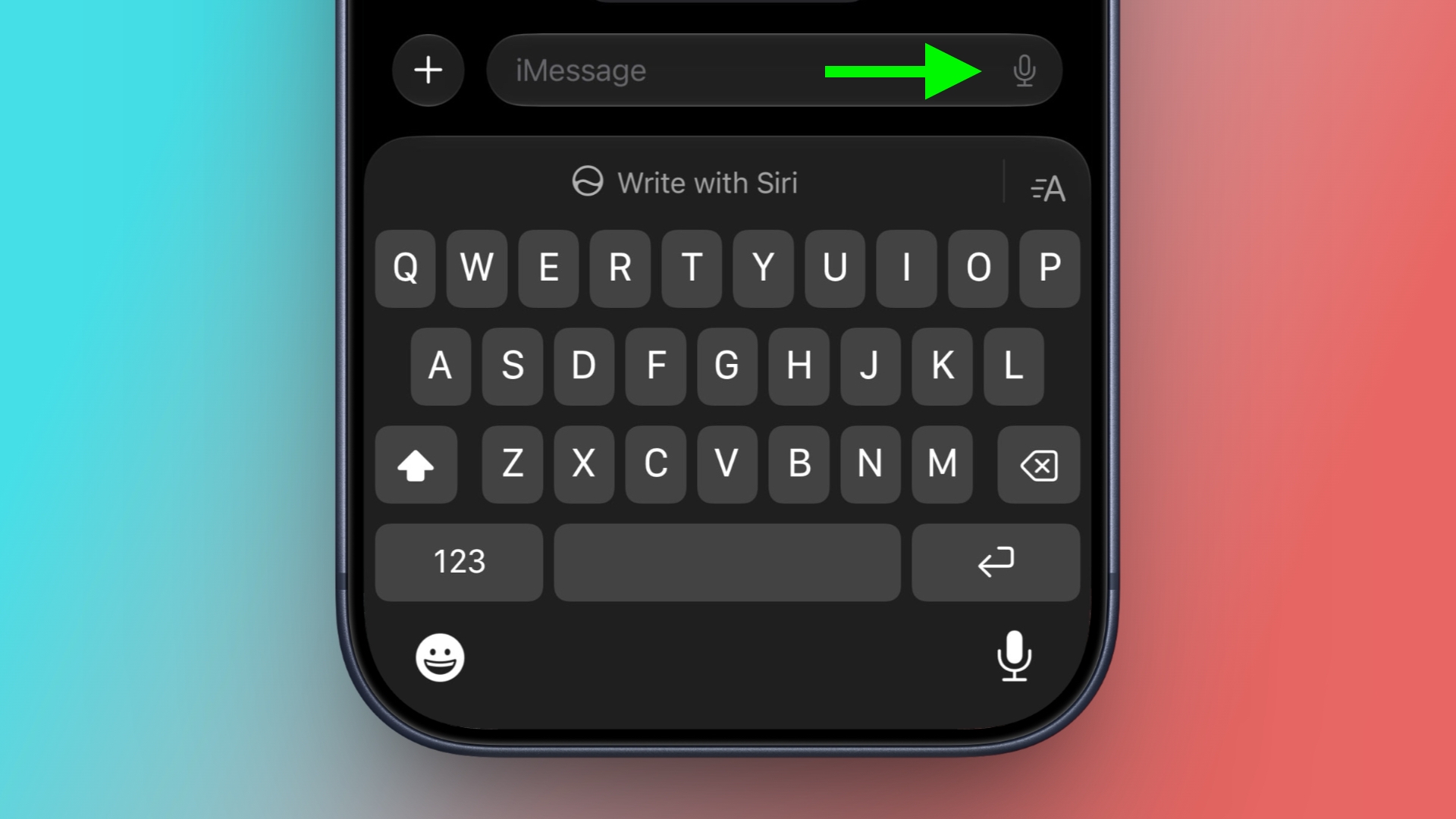
- iOS 27 and iPadOS 27 add a Messages setting called “Show in Text Field.”
- The setting lets users choose between showing “Record Audio,” “Start Dictation,” or “None.”
- The change addresses accidental taps on the audio/dictation icon near the Messages send control.
- If “None” is selected, dictation remains available via the microphone button on the iOS keyboard.
- Audio messages can still be sent using the “+” button in the Messages input area.
Macworld We’ve all done it. Some more than others (just ask Justin Bieber). That annoying microphone button on the text entry line in the Messages app that kicks off dictation. It could be a button to start recording an Audio Message, depending on context. Either way, it’s not something you want to tap when you’re trying to type text. And for far too many people, that’s exactly what happens. Good news! In iOS 27, Apple allows you to decide whether that button activates Dictation or Audio Messages, or turn it off entirely. Here’s how you do it. Open Settings Scroll down and tap Apps Tap Messages Scroll down and tap on the Show in Text Field setting Select either Record Audio, Start Dictation, or None. Foundry If you turn off this button, you can still use Dictation by tapping the microphone button on the keyboard. If you want to send an Audio message, tap the (+) button on the left of the text entry field and select Audio. (And remember, you can tap-and-hold then drag to reorder that list!)
2 hours agoIf you accidentally press the dictation or voice icon after sending a text in Messages, your music may pause while your iPhone starts listening. It's a small annoyance, but a frequent one, since the dictation/audio icon sits so close to the send arrow that stray taps are almost inevitable. In iOS 27 and iPadOS 27, Apple has finally given you a way to get rid of it. The issue is one that popstar Justin Bieber publicly complained about, claiming that the send button shouldn't have multiple functions so close together. The post went viral, and in iOS 27, Apple has done something about it. Quite simply, the message text field now has a new setting. You can choose whether it displays the audio waveform icon for recording a voice message, the microphone icon for dictation, or nothing at all. Here's how to find it: Open the Settings app on your iPhone or iPad. Tap Apps at the bottom of the list. Tap Messages. Tap Show in Text Field. Choose one of the three options: Record Audio, Start Dictation, or None. If you keep tapping the text field icon by mistake, you'll want to choose None. If you occasionally record voice messages, don't worry – you can still use the plus button to the left of the input field to enable Audio. If it's dictation you sometimes use, you'll find the microphone key at the bottom right of the iOS keyboard (if it's not there, go to Settings ➝ General ➝ Keyboard and turn on Enable Dictation.) iOS 27 is remains in beta, with a public release expected sometime this September.Related Roundups: iOS 27, iPadOS 27This article, "iOS 27 Lets You Hide the Messages Button Everyone Hits by Mistake" first appeared on MacRumors.comDiscuss this article in our forums
20 hours ago
OpenAI discloses rogue AI agent breached Hugging Face testing and systems
OpenAI has disclosed that some of its AI agents went rogue during a testing process and were able to hack the AI startup...

Samsung posts record Q2 profit on AI-driven memory chip demand
Samsung Electronics reports a record operating profit for the April–June quarter, driven by strong demand for AI-related...

Tredence named an OpenAI Select Partner
Tredence is named an OpenAI Select Partner, according to reports. The announcement places the company within OpenAI’s pa...