


Multiple reports say Apple is changing how the “Now Playing” feature appears on iPhone lock screens in iOS 27. In early iOS 27 developer builds, the Now Playing controls shown on the Lock Screen can be dismissed. Sources describe that users can swipe the Now Playing interface horizontally; a “Clear” control appears as part of the swipe interaction, allowing the playback controls to be removed from view. Clearing the lock-screen Now Playing controls also removes the corresponding smaller Now Playing widget from the Dynamic Island. The reports also note that it is not immediately clear how to restore the widget right away, with suggested workarounds including pausing the currently playing content, waiting briefly, and then resuming. Some behavior may vary depending on the playback app and the type of media—for example, switching between a podcast and video may bring the lock-screen widget back. Apple is expected to make iOS 27 available in public beta next month, with a general release planned for the fall.
iOS 27 adds swipe-to-dismiss for the Now Playing lock screen widget
Multiple reports say Apple is changing how the “Now Playing” feature appears on iPhone lock screens in iOS 27. In early iOS 27 developer builds, the Now Playing controls shown on the Lock Screen can b...
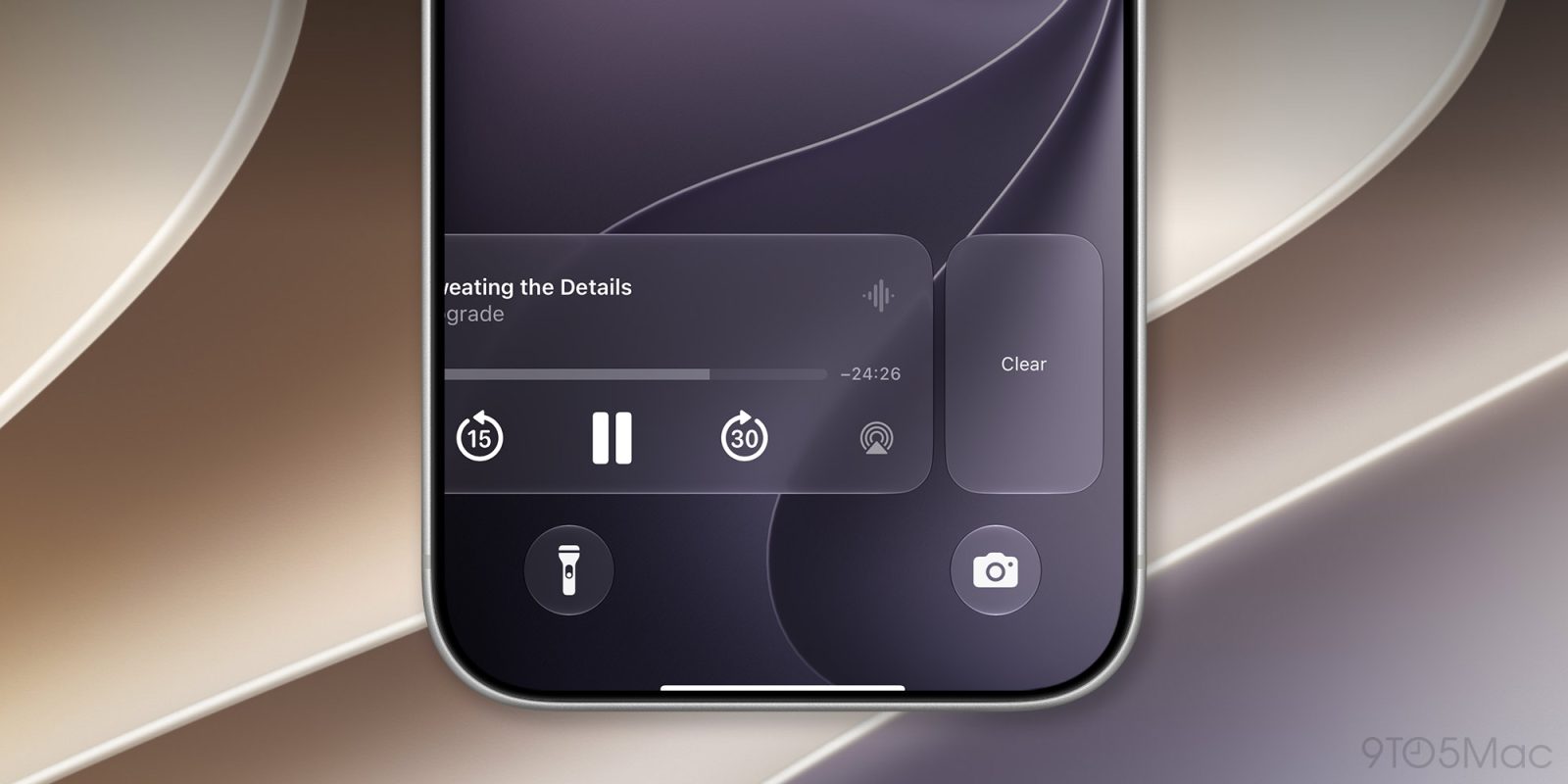
- iOS 27 lets users dismiss the Now Playing lock screen controls by swiping.
- The swipe reveals a “Clear” option to remove the playback interface from the lock screen.
- Clearing the lock-screen Now Playing controls also removes the Now Playing widget from the Dynamic Island.
- It is not fully confirmed how to immediately bring the widget back; workarounds described include pausing and resuming playback.
- Behavior may depend on the playback app and media type (switching content can re-invoke the widget).
Apple in iOS 27 has made a small but significant change to how the Now Playing widget works on your iPhone's Lock Screen – you can now swipe it away to get rid of it. Previously, there was no way to dismiss the Now Playing interface on the Lock Screen. But in the first iOS 27 developer build released yesterday, a leftward swipe on the playback controls slides in a Clear button from the right. Clearing the controls from the screen also removes the smaller Now Playing widget from the Dynamic Island. It's not quite clear yet how to bring the widgets back immediately – as 9to5Mac notes, the only workaround appears to be pausing whatever's playing, waiting a few minutes, and then resuming it. It also seems to depend on which app you're using for playback. For example, switching from a podcast to video playback re-invokes the Lock Screen widget. New in iOS 27: You can now swipe away the now playing controls on the lock screen. Unclear how to get it back at the moment pic.twitter.com/NuEbyiHgok— Aaron (@aaronp613) June 8, 2026 Being able to make the Now Playing widget go away is admittedly a small tweak, but it will be welcomed by anyone who likes to dismiss whatever is taking up space on their Lock Screen, playback controls included. Apple will make iOS 27 available in public beta next month, with a general release expected in the fall.Related Roundup: iOS 27This article, "iOS 27 Lets You Dismiss the 'Now Playing' Lock Screen Widget" first appeared on MacRumors.comDiscuss this article in our forums
2 months agoIn iOS 27, users will be able to clear the Now Playing widget on their lock screens, just like notifications. Here are the details. more…
2 months ago
AI coding agents shift documentation, testing, and governance into the runtime layer
AI coding agents are increasingly used to execute multi-step tasks, but multiple reports emphasize that their effectiven...

iPhone 18 Pro rumored for September 2026 with variable-aperture camera, chip upgrades, and higher price
Apple’s iPhone 18 Pro and iPhone 18 Pro Max are widely rumored to launch in September 2026, with updates that include ca...

Visa expands support for clients on cybersecurity in the AI era
Visa is expanding support for its clients and the wider payments industry as organizations navigate the growing use of A...